
Most people probably haven't noticed, but everyone couple of days we post a few updates to FriendsForPeace.org. Mostly they are small changes like bug fixes, and minor tweaks, sometimes they have been big (like when we added slideshows) and I make a point to bring them up here. Today's update was about 1/2 way between the two. While most of the changes were small design improvements, there are two changes I wanted to point out.
First, you can once again get the recent images from the home page with 1 click. If you click "Browse more photos" you will be taken to the new browsing page, which starts with a slideshow of the recent images. Right now that page doesn't have any new features on it, but it creates a space for us to provide more ways for to explore the pictures. We are kicking around ideas like: showing the most popular tags, slideshows by city and state, popular searches. We're not sure which we'll do in what order, but stay tuned to see what we come up with. If you have ideas please let us know and we'll add them to the mix.
The second improvement today is a small improvement to the search engine. If you enter a US state, you will get only images from that state. So to see all the images from Colorado search for CO. Hopefully this will make it easier to find images that are interesting to you.
Your input is always welcome.
Aaron
Coding for Peace
Mar 21, 2007


Mar 19, 2007
People like me
One of the things I enjoy about Friends For Peace is watching images appear of people with similar interests.
For example, I put up my dog Patrick, then Leigh and Peter included Maggie in their picture:


Last Thursday I noticed Eric, and it was nice to not be the only programmer around.


Although my poor Sammy is still the only rabbit to appear so far.

What interesting pairings of pictures have you found? Put their flickr links in the comments and I'll highlight them in a later post.
Aaron
Coding for peace
For example, I put up my dog Patrick, then Leigh and Peter included Maggie in their picture:
Last Thursday I noticed Eric, and it was nice to not be the only programmer around.
Although my poor Sammy is still the only rabbit to appear so far.
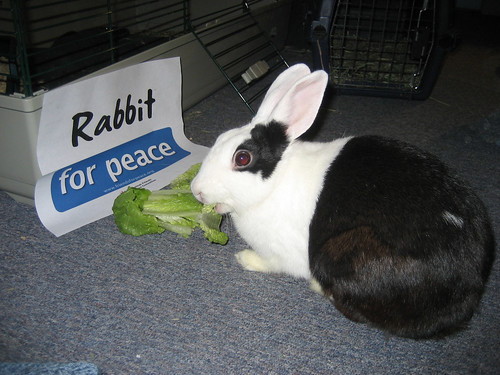
What interesting pairings of pictures have you found? Put their flickr links in the comments and I'll highlight them in a later post.
Aaron
Coding for peace
Mar 16, 2007
Peace events: Need a sign? Have a photo?
This weekend, hundreds of communities are holding commemorations of the fourth anniversary of the Iraq war. If you have pictures from peace events -- especially photos that include Friends for Peace signs -- feel free to post them to our site.
To find peace events near you, go to the United for Peace and Justice coalition's web site.
If you can't make a peace event, I encourage you to make your own sign and post it up at work, at home, and we've even heard of a few people posting signs on their cars. (However, I hope signs in cars are not blocking the view through the windows...)
Peace,
Mark
Red head for peace
To find peace events near you, go to the United for Peace and Justice coalition's web site.
If you can't make a peace event, I encourage you to make your own sign and post it up at work, at home, and we've even heard of a few people posting signs on their cars. (However, I hope signs in cars are not blocking the view through the windows...)
Peace,
Mark
Red head for peace
Mar 7, 2007
New Design
One of the first comments we got about the Friends For Peace website is that people wanted the images to be larger; well, we've delivered. Thanks to Carl's efforts to redesign the home page we now have bigger images and the slideshow is integrated into the home page. One of the nice things about this new layout is the site should perform better on low speed connections, since the images now load in a more sensible order. Over the next few days we're planning to design more of the site, to improve your experience overall. Please keep sending us feedback, we like to know how people are using the site and ways we can make it better for you.
Aaron
Coding for Peace
Aaron
Coding for Peace
Feb 23, 2007
I like this one
You may have noticed that at the bottom of each photo you can vote online for the photos you like. (Just click on "I like this one.") But, you may not know that when you vote, your votes bring your favorites up to the front of the line. The more you vote and email a photo to friends, the more popular it becomes -- and the most popular photo will rise to the top of the homepage.
All of the photos have been great, and we have some favorites here at AFSC. Here are some of the photos we have been talking about. (Click on the pictures to see the larger version.)
Most hopeful:
 Unique Location:

Creative use of sign:
 You can email pictures to friends and vote as many times as you want. Tell us about your favorites.
All of the photos have been great, and we have some favorites here at AFSC. Here are some of the photos we have been talking about. (Click on the pictures to see the larger version.)
Most hopeful:
Unique Location:Creative use of sign:
You can email pictures to friends and vote as many times as you want. Tell us about your favorites.
Feb 16, 2007
Calling all Cameras!
Many of you have told us that you want to take pictures in your community groups, churches, schools, and in other venues -- but you are not sure how to organize it. So, we created a guide for hosting a "Friends for Peace Photo Booth."We have created this Kit to provide some guidance, tips, and materials. Please download the kit and print it out.
Photo Booth Kit (PDF 177 kb)
Go out this weekend and take lots of pictures and upload them to the site. Let us know how it goes and if you have any other tips for your fellow photographers.
Photo Booth Kit (PDF 177 kb)
Go out this weekend and take lots of pictures and upload them to the site. Let us know how it goes and if you have any other tips for your fellow photographers.
Feb 14, 2007
E-card Valentines
If you got Peter Lems's email about sending e-card Valentines, here's how to do it.
Step 1: Use the thumbnails to the right or the search engine to find the photo you'd like to send with your Valentine message.
Step 2: Click on the "Send on a Friend" link just below the big image on the page.
Step 3: Type in your email, your friends'/loved ones' email addresses, and your message into the e-card form. In "Subject," add your email subject line. It could be "From your friend for peace" or "Valentine for peace" or anything you'd like.
Step 4: Hit the "send" button. Your email(s) is on its way.
Any comments or questions? Comment away!
Mark
Friends for Peace Coordinator
Step 1: Use the thumbnails to the right or the search engine to find the photo you'd like to send with your Valentine message.
Step 2: Click on the "Send on a Friend" link just below the big image on the page.
Step 3: Type in your email, your friends'/loved ones' email addresses, and your message into the e-card form. In "Subject," add your email subject line. It could be "From your friend for peace" or "Valentine for peace" or anything you'd like.
Step 4: Hit the "send" button. Your email(s) is on its way.
Any comments or questions? Comment away!
Mark
Friends for Peace Coordinator
Subscribe to:
Posts (Atom)